
Governed runs and statuses
A governed run is a bounded work effort with an objective, scope, mission contract, required evidence, status history, and acceptance criteria. The Execution Runs dashboard summarizes those runs so a user or reviewer can see what is active, blocked, repaired, verified, stopped, or closed.
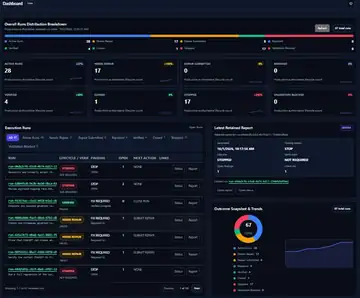
Run table columns
| Column | Meaning |
|---|---|
| RUN | The governed run ID and short objective/title. Each run represents one bounded work effort. |
| LIFECYCLE / VERIFICATION | The run's current lifecycle state and whether its acceptance or verification criteria passed, failed, or were not required. |
| FINDING | The current governance result, such as stop condition, required fix, verified complete, or blocked validation. |
| OPEN | Number of unresolved items, findings, or actions still open for that run. |
| NEXT ACTION | The next controlled action required to move the run forward, such as submit repair, close run, review status, or no action. |
| LINKS | Shortcuts to the run status page, report, evidence, or other related artifacts. |
Dashboard status filters
| Status | Meaning |
|---|---|
| All | Total governed runs visible in the current workspace or filter. |
| Active Runs | Runs still open and moving through the governed workflow. |
| Needs Repair | Runs that failed verification or require corrective action before completion. |
| Repair Submitted | Runs where repair work has been submitted and is awaiting review or verification. |
| Repaired | Runs where repair work has been accepted or resolved but may not yet be formally closed. |
| Verified | Runs that have passed the required acceptance or verification checks. |
| Closed | Runs that are complete and formally closed. |
| Stopped | Runs intentionally halted, cancelled, superseded, or marked as not required. |
| Validation Blocked | Runs that cannot be verified yet because required evidence, system access, environment state, or reviewer input is missing. |
Common lifecycle and verification values
| Value | Meaning |
|---|---|
| PASSED | The run's defined acceptance or verification criteria passed. |
| FAILED | The run did not satisfy its verification criteria and needs repair or closure. |
| NOT REQUIRED | Verification was not required for the current stopped or administrative state. |
| OPEN | The item remains unresolved or reviewable. |
| Verified Complete | The run has evidence sufficient to treat the work as complete. |
| Required Fix | A concrete repair or correction is needed before the run can complete. |
How to use this view
Use OPEN and NEXT ACTION together. A run with open items should not be treated as complete until the required repair, review, evidence capture, or closure action is performed. A run with Verified status and zero open findings is ready to be closed or retained as completed evidence.
Stopped runs are not automatically failures. They may represent work that was cancelled, superseded, intentionally halted, or determined to be no longer required. The report link should explain why the run stopped.